
Overview
Before documents can be created and published in DCMS, four configuration items need to be in place: Categories, Reviewer Types, Document Types, and a Repository. This article walks you through each one and ends with links to get your first document through the full approval cycle.
The most common mistake during initial setup is trying to design the perfect system before configuring anything. Start simple — all of these settings can be adjusted later.
Recommended starter configuration:
Categories: IT, HR, Operations, Legal
Reviewer Types: Owner, Manager, Executive
Document Types: Policy, Standard, Guideline, Procedure
Repository: Use the default repository already in place.
Step 1: Set Up Categories and Subcategories
-
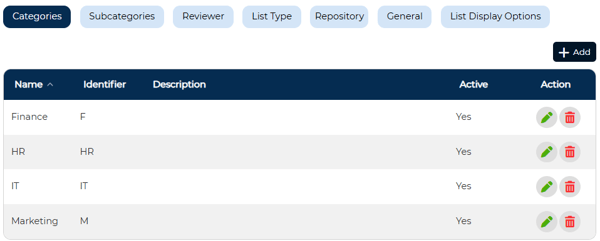
Navigate to the Categories section in DCMS settings.
-
Categories represent how documents are grouped across your organization — typically by department. S
-
ubcategories represent key processes within each department.
💡Start with 3–5 categories. Examples: IT, HR, Finance. Subcategories might include Access Control or Code of Conduct under the appropriate department.

Step 2: Set Up Reviewer Types
-
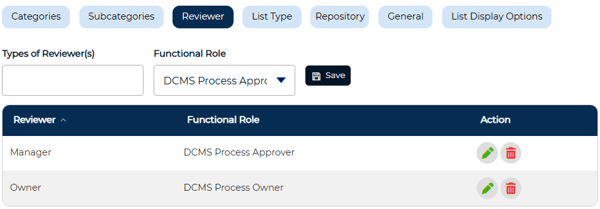
Navigate to Reviewer Types.
-
Reviewer types are roles, not specific people — they define the sequence of approvals a document must pass through before it becomes official.
💡Start with two roles: Owner and Manager. If your organization has different workflows per department, configure a shared approval flow first and refine it later once the system is running.
Step 3: Set Up Document Types
-
Navigate to List Types.
-
Document Types determine how documents are categorized and how users create them. Add additional types only after you've validated the basic workflow.
💡Recommended starting types: Policy, Procedure, and Standard.
When configuring each document type, you'll also need to assign default approvers and reviewers. These defaults determine who is automatically included in the approval workflow when a document of that type is created.
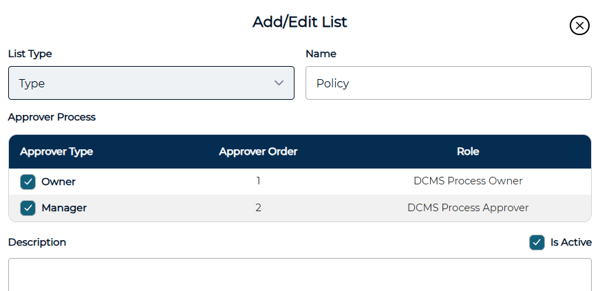
Add additional document types only after you've validated the basic workflow.
Step 4: Configure the Repository
A repository is required for attachments, imported documents and for documents to be published. Without one, documents can be created and submitted but cannot reach Published status.
💡Use the default repository during initial setup.

Next Steps: Create and Publish Your First Document
Once configuration is complete, the best way to validate your setup is to take one document all the way through the full cycle before expanding further.
These guides can help you with the next steps.
Creating a New Document — how to create a document, complete the required fields, assign reviewers, and submit for approval.
Document Approval and Publishing — how approvers review, approve, and publish a document once it's been submitted.
Validating Your Setup
Before expanding your configuration, confirm your first document completes the full cycle: Create → Submit → Approve → Publish.
If something doesn't work, check the following: reviewer types are configured, a repository is set up, all required fields are completed, and approvers are assigned. Adjust and retry — this is a normal part of the process.
Best Practices
Keep your initial setup minimal. Use the starter configuration recommended above and resist the urge to mirror every real-world workflow upfront. Build one successful document cycle before adding complexity — additional categories, reviewer types, and document types are much easier to configure once you've seen the system working end to end.
💡 A Note Before You Expand
You don't need a perfect system to get started. A working system, even a simple one, creates clarity. From there, you can refine and expand your configuration with confidence.
Related Articles