
If a Conformity Engagement was created by mistake, it can easily be removed even if you have begun working in it. Depending on whether the conformity was merged into your Living Control Set, removal takes one or two steps.
Step 1: Remove the Conformity Engagement
Go to the Assessment Management module and open Engagement Management . Find the conformity you created by mistake and delete it.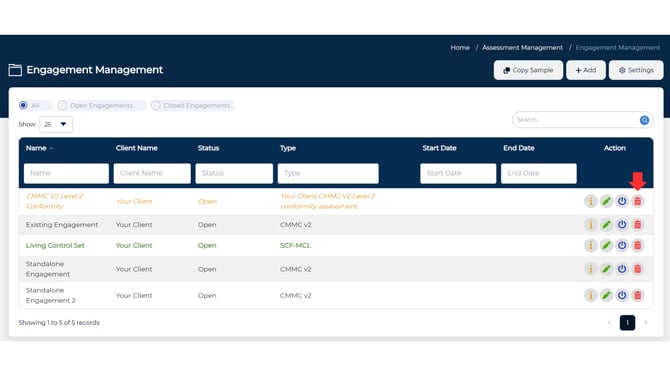
💡 If this conformity was not merged into your Living Control Set, this step is all that's needed. If it was, continue to Step 2.
Step 2: Remove the Merged Iteration (if applicable)
If the conformity's delta was merged into your Living Control Set, you'll need to remove it from there as well. From the Engagement List, select the Living Control Set Engagement.
From the Iteration List, locate the conformity iteration and delete it. -1.png?width=670&height=377&name=Untitled%20design%20(1)-1.png)
Once you've completed the steps above, the conformity has been successfully removed. No further action is needed.
If anything looks off, such as the engagement still showing up or controls from the conformity still appearing in your Living Control Set, contact support.