
Add the EVE AI Subscription
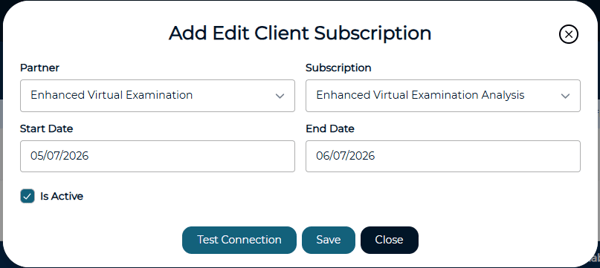
Navigate to Administration > Manage Clients and edit the specific client. Select the Client Subscriptions tab. Click the + Add button to open the Add Edit Client Subscription dialog. Set the following:
- Partner: EVE AI
- Subscription: EVE AI Analysis
- Start Date and End Date: enter your subscription period
- Check the "Is Active" box
Click Test Connection to verify everything is connected, then click Save.
Next Steps
Once your subscription is active, you can use the Enhanced Virtual Examination option when establishing your Living Control Set.
For instructions on uploading documents and reviewing your results, see Preparing Documentation for Enhanced Virtual Examination (EVE) Analysis.