
⚠️ You must have an appropriate TPRM entitlement to complete the actions below
To add a new third party into the system, you will first create a Third Party Profile. This establishes the vendor or external organization as a managed entity within your Third Party Risk Management (TPRM) program and becomes the foundation for related solutions, assessments, and ongoing monitoring.
Navigate to the Third Party List
From the main navigation menu, go to: Third Party Risk Management > Third Parties List - The Third Parties List displays all existing third parties, along with key summary information such as name, type, and status. Use this view to confirm that the third party does not already exist before creating a new profile.
Start the Profile Creation Process
In the Third Parties List view, click Add to begin creating a new Third Party Profile. - This action opens the Third Party / Third Party Contact Details form, which is the initial step in defining the core attributes of the third party.
Complete Third Party Details & Contact Information
After clicking Add, the Third-Party Details form will appear. This form is used to capture essential identification and contact information for the third party. Typical fields may include (field labels may vary slightly based on your configuration):
- Third-Party Name (required): The legal or primary business name of the organization. This should match your contracts, purchase orders, or other formal documentation.
- Type (required): The classification of the third party (for example, Supplier, Service Provider, Cloud Provider, Managed Security Service Provider, Consultant). Accurate classification supports reporting and risk segmentation.
- Primary Contact Name: The individual who will serve as your main point of contact at the organization.
- Primary Contact Email: The email address used for correspondence, including assessments, requests for evidence, and remediation communication.
- Primary Contact Phone: A direct phone number or main line for urgent inquiries or incident coordination.
- Address Information: Physical address details such as street, city, state, postal code, and country, which can support contractual, regulatory, or data residency requirements.
- Website / URL: The organization’s main website or portal.
- Internal Owner / Relationship Manager (if available): The person within your organization responsible for managing the relationship with this third party (e.g., a procurement lead, IT manager, or vendor owner).
- Notes / Description: Any relevant context, such as business purpose, scope of services, or known regulatory or compliance considerations.
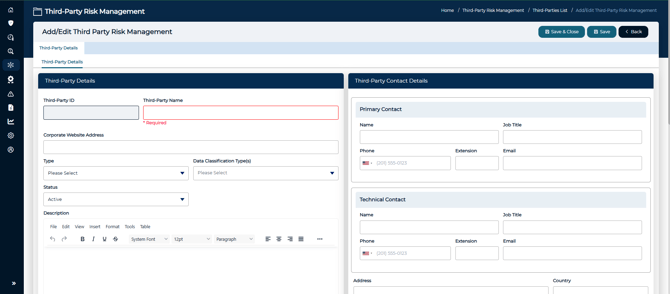
Tip: The only two fields in the editor that are required are the Third-Party Name and Type. However, it is considered best practice to complete as many relevant fields as possible during the initial setup to reduce follow-up questions and rework later in the assessment process.
Saving the Initial Third Party Profile
Once all required fields are completed, choose one of the following options at the bottom of the form:
-
Save – Saves the record and keeps you in the profile so you can continue editing and configuring additional details.
-
Save & Close – Saves the record and returns you to the Third Parties List view.
Tip: Use Save when you plan to immediately add more information (such as solutions, assessments, or custom attributes) within the newly created profile. Use Save & Close when you are finished with initial entry and do not need to make further changes at that moment.
Accessing the Full Profile and Additional Tabs
If you use the Save option:
-
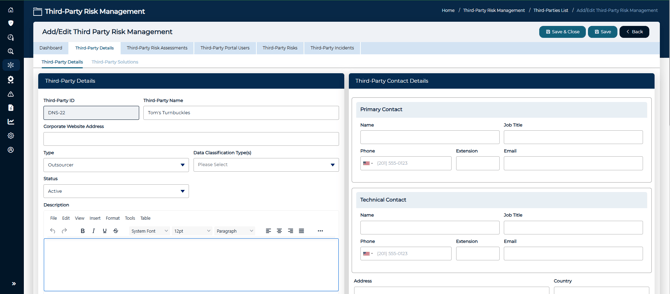
The system will save the initial record, then automatically open the remainder of the tabs associated with the Third Party Profile.
-
These tabs typically include areas for solutions, assessments, documents, risk details, and other configuration options, depending on your implementation.
-
From here, you can:
-
Add Third Party Solutions that represent specific services or products provided by the vendor.
-
Initiate or assign assessments focused on the third party or on specific solutions.
-
Attach relevant documentation, contracts, security reports, or policies.
-
Record and track risks, findings, and remediation activities related to the third party.
-
If you use the Save & Close option:
- You must search for the newly created profile, edit it, and then the above actions will become available.
Ongoing Updates and Data Integrity
Any time you make a change to a field(s) within the Third Party Profile, remember to click Save to preserve your updates. Unsaved changes will not be reflected in your TPRM workflows, reporting, or assessments.
Recommended practices:
-
Save periodically when making multiple changes to avoid data loss.
-
Review key contact and ownership fields regularly to ensure they remain current, particularly when staff or relationship managers change.
-
Confirm that third-party type and other classification fields remain accurate as the relationship or service scope evolves. By following these steps, you establish a complete and accurate Third Party Profile that supports consistent vendor oversight, targeted assessments, and effective third-party risk management across your organization.
💡 Learn More
For more information on creating Third Party Solutions, Assessments, Users, and more -see the following: