
Third-Party Risk Assessments (TPRAs) can be configured to align with the risk profile of each vendor or partner. This configuration lets you define the assessment type, frequency, and specific requirements so that each assessment captures the appropriate level of risk information.
You can configure a TPRA for a single third party, or you can set one up once and reuse it across many third parties so you are not rebuilding the same configuration for every vendor. Reusing a TPRA is especially helpful when you manage large numbers of vendors and want to apply consistent assessments by risk level, for example a single Critical, High, Medium, or Low TPRA applied to vendors at each risk tier.
Create a TPRA Configuration for a Third-Party
Create a TPRA configuration from the profile of the specific third party you want to assess.
1. In the TPRM Module, open the Third-Parties List.
2. Select to edit the third-party
3. Open the Third-Party Risk Assessments tab.
4. Click Configure TPRAs and then New.
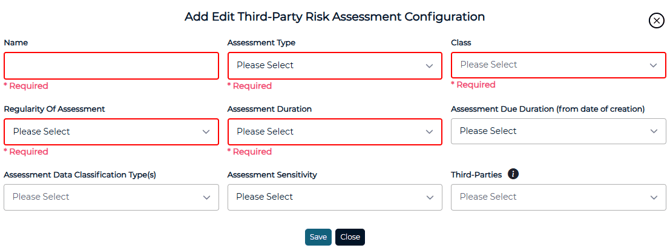
5. Enter the configuration details and then Save

Create a Reusable TPRA Configuration
To reuse the same configuration across vendors, create it as a default in TPRM Settings rather than from a single vendor's profile. A default configuration can apply to all of your third parties or only to specific ones.
1. From the TPRM Module, open TPRM Settings.
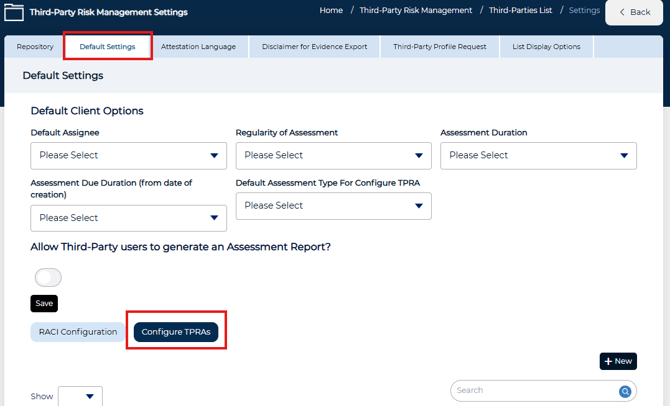
2. Select Default Settings, then Configure TPRAs.
3. Click +New.
4. Enter the configuration details
5. Use the Third-Parties dropdown to select where the configuration will be available
6. Save the configuration.
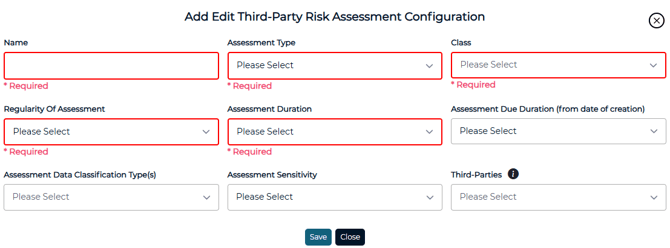
💡Leave the Third-Parties dropdown blank to make it available to all third parties, or select one or more third parties to make it available only to those you choose.
Once saved, the configuration is available for selection when creating a new assessment for a third-party. You set it up once and it is ready for every third party it applies to, without recreating it from each vendor's profile.
Related Articles