How It Works
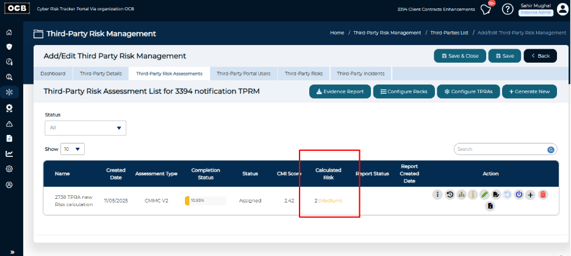
Once enabled, the system automatically calculates a Calculated Risk value for each assessment. The score is based on your responses and the corresponding Finding Risk Ratings defined for each practice.
How to Enable the Feature
-
Go to Administration → Manage Clients → Client Products → Third-Party Risk Management.
-
Turn on Enable Risk Calculation for Risk Assessment.
-
After enabling, a new Calculated Risk column will appear under:
Third-Party Risk Management → Third-Party List → Assessment List.
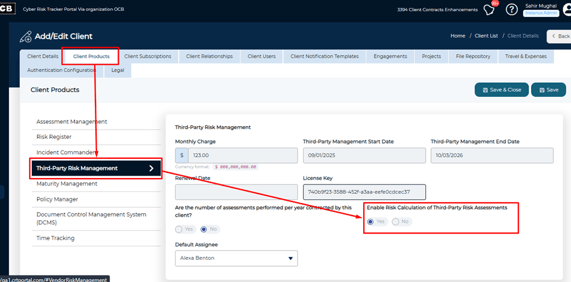
Once enabled, the system automatically calculates and displays the risk score for each assessment.
How the Risk is Calculated
The Calculated Risk is determined using this formula:
Rounded [(Sum of all risk points for responses) ÷ (Total number of practices answered)]
Each practice contributes to the total based on:
-
Response Points: The score assigned to each selected response.
-
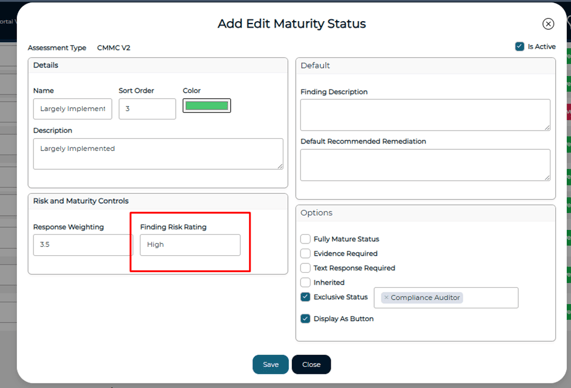
Finding Risk Rating: The risk level (e.g., Low, Medium, High, Critical) assigned to each maturity status.
-
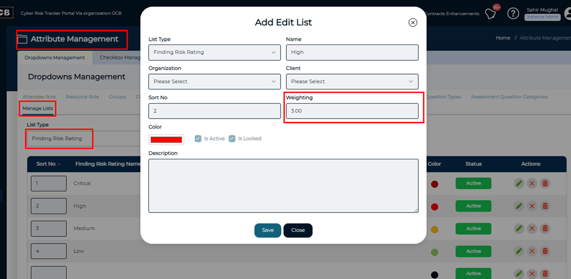
Finding Risk Rating Weightage Points: The numeric value associated with each rating (e.g., Low = 1, Medium = 2, High = 3, Critical = 4).
-
Total Number of Practices Answered: The total count of practices with responses.
You can also view or adjust the Finding Risk Rating and its Weightage Points.
-
Navigate to Assessment Editor → Edit Assessment Type → Maturity Statuses for the Finding Risk Rating against each response.
-
Navigate to Administration → Manage Lists → Finding Risk Rating → Weighting for the weight set against each Finding Risk Rating